M cAfee AntiVirus (AV) Plus 2013 is a sub-$50 home security suite featuring a redesigned user interface (UI), along with extra security too...
Just how much money are you willing to be paid
to stop using Facebook altogether? Well, Paul Baier’s daughter was
offered $200 (to be paid out in stages) to quit Facebook, and
surprisingly, she said “Okay” to that deal, and will receive $50 this
coming April, with the remaining $150 on June 26th. Why June 26th? Well,
that particular date would mean the end of the school year, which
translates to an entire five months of life without Facebook.
Just before you wonder whether Paul is being too harsh on his
daughter, it was actually her idea to quit Facebook. Paul said, “She
turns it on, she’ll have 30 to 40 — 50 little alerts things popping up
too. She’s frustrated she can’t find babysitting jobs and she said,
‘Dad, would you pay me to get off Facebook?’ I thought she was joking.”
I guess this is where the wheat is separate from the chaff,
considering how she’s an honors student. I’m also quite sure that there
are other honors students out there who can still maintain a balance
between Facebook and life, but to each his or her own, eh?
Over the last week, several Instagram users began reporting that the photo-sharing app was locking them out of their accounts, and asking them to confirm their identity by showing photo ID
These incidents, which CNET first covered Tuesday, were reportedly a result of Instagram's new terms of service, which came into effect on Jan. 19.
At first, users were worried that their accounts were hacked. But Talking Points Memo confirmed Friday that the ID requests were actually legitimate, and came from Instagram and Facebook, which now owns the photo-sharing app.
"This is just a general practice for both Facebook and Instagram to request photo IDs for verification purposes depending on what type of violation may have occurred," a Facebook spokesperson told Talking Points Memo. "Unfortunately, I can’t share more with you beyond that as we don’t go into details beyond that."
Identification is requested in cases when the social networks suspect that their terms of services have been violated. It aims to confirm who's behind an account, and perhaps to determine whether a user is underage (the minimum age to use both services is 13).
As Instagram doesn't require users to provide their real names, it's unclear why the photo-sharing app would ask for official ID. Facebook, on the other hand, does ask for users' real names. The social-network giant declined to comment on the matter.
Instagram's terms of service give the company the right to "refuse access to the Service to anyone for any reason at any time."
We're seeing numerous reports that Facebook has begun enabling Graph Search for users that were among the first to sign up for the beta program last week. The ambitious new feature promises to change the way you find things on the social network by returning results to natural language queries like "restaurants nearby my friends like" and "pictures of my friends and me." Once you accept Facebook's invitation to try Graph Search, the menubar at the top of the site will switch to a new design that places universal search on the left and relocates friend requests, messages, and notifications over to the ride side of the screen. If you're lucky enough to be among the early participants, feel free to discuss your thoughts on the new Facebook below. And for those that haven't gotten around to it yet, it's not too late to join the Graph Search waiting list.
The following video is from Wednesday's MarketFoolery podcast, in which host Chris Hill, along with analysts Austin Smith and Joe Magyer, discuss the top business and investing stories.
In this segment, the guys break down the latest quarterly results from Google (NASDAQ: GOOG ) . Both of them make the case that this is more of a "moat assessment" for Google. By that they mean that this is a quarterly chance for investors to gauge Google's moat as a business. In this case, the moat appears to be widening. Joe makes the case for why Google's next purchase should be Twitter.
The relevant video segment can be found between 0:33 and 6:52.
As one of the most dominant Internet companies ever, Google has made a habit of driving strong returns for its shareholders. However, like many other web companies, it's also struggling to adapt to an increasingly mobile world. Despite gaining an enviable lead with its Android operating system, the market isn't sold. That's why it's more important than ever to understand each piece of Google's sprawling empire. In The Motley Fool's new premium research report on Google, we break down the risks and potential rewards for Google investors. Simply click here now to unlock your copy of this invaluable resource, and you'll receive a bonus year's worth of key updates and expert guidance as news continues to develop.
Via MarketFoolery podcast (Thank You)
It was reported on Tuesday that Google is planning to consolidate its United Kingdom offices in a brand new development near London’s King’s Cross Station.
The new development is worth a reported £1 billion.
The Internet search giant will move to the one-million-square-foot, 11-storey building on a 2.4-acre plot at the soon-to-be bustling Kings Cross Central site, which is behind the recently redeveloped Kings Cross Station and adjacent to St Pancras International rail station.
The area behind and between the two North London rail stations has been undergoing a massive regeneration since the opening of the London-to-Paris Eurostar terminal at St Pancras in 2007.
Other organisations recently moving to the area include IDG, The Guardian, BNP Paribas and fashionable art college Central St Martin’s.
Matt Brittin, Vice-President for Northern and Central Europe, Google, commented that the move is “a big investment by Google. We’re committing further to the U.K. – where computing and the web were invented. It’s good news for Google, for London and for the U.K.”
Google currently has offices split across London – two are on Buckingham Palace Road in Victoria, and another is between Holborn and Tottenham Court Road. Google’s lease for the Victoria offices ends in 2016, when Google hopes the AHMM-designed new Google headquarters will be ready at King’s Cross.
Google also has Campus, a large space in London’s Shoreditch that offers offices for technology and media start-ups as part of London’s Tech City project.
Simon Allford, Director, AHMM, said, “Working with Google is a special
opportunity to create an innovative new headquarters of scale and
significance that both builds on King’s Cross’ rich tradition of heroic
construction and contributes to the fulfilment of the development’s
visionary masterplan.”
RIM's yet-to-be-announced BlackBerry Z10 handset has come face-to-face with the iPhone 5 in a new comparison video.
The all-touchscreen BB10, which is all set for a grand unveiling at the end of January, has been leaked more times than we care to remember, but never in this much deal and never next to its chief nemesis.
German blog telekon-presse.ak has provided a hands-on with what is all-but-certain to be the Z10, comparing design, build, software and features with Apple's latest and greatest mobile handset.
According to the hands-on comparison, the BB10 voice control system does a better job than Siri during a request to send a message. It was more accurate and faster on the Z10 than the iPhone 5.
What's left to see?
The video also shows how the respective operating system deals with incoming text messages and offers a neat look at BB10's Peak View feature, which gives users a quick look at items in the BlackBerry Hub.
Other highlights include a look at the different ways multitasking is handled by the OS, and how app icons are presented while it also shows how to kill active apps and offers a look at the respective Twitter apps.
You can check out the interesting video comparison below. At this rate RIM will have nothing left to reveal on January 30, when it holds launch events around the world.
What do you think? On that evidence can the Z10 challenge the iPhone 5 on a level playing field? Let us know in the comments section below.
Via TechCrunch (Thank You)
For the first two months Windows 8 was on the market, the news alternated between success and disaster. One report said it was selling, another said it was a stiff.
After two months, Microsoft is clearing up the picture, and it's not a best case scenario. Tami Reller, chief marketing officer and chief financial officer for the Windows product group at Microsoft, said at the J.P. Morgan tech forum at CES 2013 that Windows 8 has sold 60 million licenses to date.
That would seem to hint at a slow-down. In December, Microsoft announced it had sold 40 million licenses in the first month of general availability. Reller's figures mean it took the company more than one month to sell half as many licenses, and during the usually lucrative Christmas season to boot.
Microsoft expanded a little on a blog post announcing Reller's comments, stating there are now more than 1,700 certified systems for Windows 8 and Windows RT. A lot were announced at CES, too.
But so far, Windows 8 is swimming against the current
of a terrible economy. This Christmas, the PC industry got a collective
pile of coal in its stockings. NPD Group said Windows 8 did nothing for
notebook sales, which were down 11 percent over the same period in 2011.
Even Apple wasn't immune to the poor economic conditions, as Macbook
sales dropped 6 percent year-over-year.
That 60 million figure comes from both commercial and
corporate sales, and in both cases, don't mean that there are 60 million
Windows 8 users out there in the whole wide world, notes Steven Cherry,
an analyst with Directions on Microsoft.
"What it doesn't tell us is how many did the customer
use. Even with consumers we're seeing downgrades. Corporations exercise
downgrade rights. So if anyone makes a statement that x number of
licenses were sold, it doesn't tell us how they were deployed," he said.
Windows Vista, for example, sold right up until
Windows 7 shipped in 2009, but many firms chose to downgrade to XP
instead, since Vista was so poorly received and unpopular.
Cherry said firms are doing that now, as well. When
Windows 8 shipped in October, he surveyed Directions on Microsoft
clients on their interest, and the large majority said they were
sticking with Windows 7.
"They also indicated their plan was to use Windows 8
to evaluate it or in places where there was a particular usage scenario
that it made sense, like tablets. There's some really good Windows 8
hardware, including Surface, but I am yet to find a good Windows 8 app
in the Windows Store," he said.
For desktop users, the lack of apps isn't really a
problem since they have legacy x86 apps to draw upon. For Surface that's
more problematic. "Without a killer app for Surface, it's only good for
Solitaire," said Cherry.
We take a look at how new and future tech developments will influence the next iPhone
When the iPhone launched, the world of mobile phone technology started changing immediately. Smartphones were the domain of high-powered businessmen and arch gadget lovers at the time, in part because of price, in part because their utilitarian looks and confusing interfaces didn't appeal to many who didn't need their advanced features.
But the iPhone managed to merge the power of smartphones with the universal, easy-to-understand interface and attractive design that most people want from a phone.
Here in 2013, the iPhone offers hundreds of thousands of apps that make just about any task user-friendly, and has some of the most advanced technology on the market. But it's important to remember that it didn't happen overnight.
There was no App Store until a year after the iPhone launched, and certainly no Retina display. And it's amazing to think that the iPhone 5 has 4G mobile broadband, while the original in 2007 didn't even have 3G.
iPhone six years on: the moment that changed tech
In just five years, Apple's iPhone has become almost unrecognisable when it comes to the technology that sits inside it, and even the outside features some incredible enhancements, despite looking a lot like the original. And now that mobile technology is the most prominent area of research and development for many companies, we are now only going to see the pace increase from now on.
But what does this mean for the future of the iPhone? Incredible leaps like the inclusion of Multi-Touch don't come around very often, but there are other ways that the iPhone will improve over time. Small advances in areas that seem boring add up to making each new iPhone the best yet, but there are still blockbusting features that just aren't ready yet, here in 2012.
iPhone 5S release date, news and rumours
The important thing is that these developments aren't just science fiction: it's nearly all technology that's being finalised, or is being actively researched and developed. Some of the time predictions might prove to be ambitious, or technologies might arrive quicker than anticipated, but it all has potential to be real.
And though we're only talking about the iPhone here and not the iPad - the technology used in them is very similar, so just about all of these developments will improve both devices. So join us in the Tap! Time Machine as we travel to see the iPhone as it will appear a few years down the line with technology that's coming about right now, and we'll also fire off into the near-distant future, looking at how the next few decades will shape and change Apple's devices.
2014 - iPhone 6
1. New camera technology
Early in its life, the iPhone was always on the back foot when it came to the camera. Apple only really got serious about it with the iPhone 4, and now it's one of the most talked-about features in each iteration. Though the iPhone 5 mostly made behind-the-scenes tweaks, such as better image processing, future iPhones will be able to go further.
iPhone 6 release date, news and rumours
Sony is known to have supplied Apple's sensors in the past, and in 2013 it will release a new image sensor that packs 13 megapixels into a tiny space without compromising image quality, thanks to a new way of designing the sensor. In fact, it should bring much-improved low-light shooting, because it can capture white pixels as well as red, green and blue. This means future iPhones would also be able to offer HDR recording, for getting maximum detail from videos.
There are other advances in phone cameras, too. Nokia's PureView 808 phone uses a huge 41-megapixel sensor to take great images. The final photos are actually only eight megapixels - what the PureView does is use around five pixels on the sensor for each pixel in the eventual image, and average the colour from those five into the final one, ensuring that it's as accurate as possible. The downside is that image sensors of that size are just too large to include in something as thin as the iPhone.
2. The development of 4G
By the time the iPhone 6 is released, 4G will have developed further than it has now, especially in the UK. For the launch of the iPhone 5, 4G was only available from one network, and in four cities (with more to come soon). By the end of 2013, all the major UK networks should be able to offer 4G connectivity, and the coverage will be up to 70% of the UK.
At the moment, EE (also known as Everything Everywhere - the parent company of Orange and T-Mobile) is the only 4G operator, and it has launched this network on the 1800MHz band in the wireless spectrum. Other operators will have to bid for different parts of the spectrum to launch their own 4G services (except for Three, which will use EE's).
Why is this important? Because the iPhone 5 only supports the 1800MHz band - not the others that will be used in the future. This means that if you buy an iPhone 5, it can only be used for 4G on EE and Three's networks in the UK, even after 2013.
We expect that the next iPhone will offer a much wider range of operating bands as the technology that powers it grows. It's likely that it will work on any 4G network in the UK without problem, much as the iPhone 4, 4S and 5 do on 3G networks.
In the US, there are two different wireless technologies, but it's possible that Apple will even be able to offer a single phone that even works on both of those network types as well.
3. Wi-Fi 802.11ac
Though Apple drastically improved the maximum Wi-Fi connection speeds in the iPhone 5 compared to even just the 4S, the change came about just as the next generation of Wi-Fi technology is being introduced. Its already possible to buy wireless 'AC' (as it's known) routers, and when the technology is integrated into phones and tablets with the kind of technology Apple uses, it's expected to offer local network connection speeds of over 500Mbps - much faster than what's possible now.
The fact that pretty much nobody has a home internet connection fast enough to make full use of this speed might make it seem a little pointless, but there are other purposes beyond surfing the web. It'll mean much higher quality and more reliable video streaming over AirPlay, for example, making playing mirrored games much smoother.
Perhaps most importantly, it will allow for extremely fast wireless data syncing with iTunes - much faster than the new Lightning connector is capable of, for example. If Apple is to ever lose a physical plug connector completely, the high connection speeds of wireless AC will be important for media lovers.
4. NFC
Near-field communication (NFC) is a very short-range wireless technology, designed to make it simple to transfer small amounts of information very quickly and easily. This has made it ideal for use in 'contactless' payment systems - think along the lines of the London Underground's Oyster Cards, where you need only tap a card on a pad to pay the correct amount.
But it's not just about payments - because it can send and receive information in just one tap of your phone, it's great for any ticketing system, so could be used to get into concerts, on the train or even to speed things up in the airport. And when used for payments, it can send your payment information and receive your receipt and any vouchers in the same single tap.
So far, Apple has said that Passbook in iOS does the same things as NFC, but that's not totally accurate. Passbook stores the information, and gets it ready for you when you arrive, but it can only communicate with other equipment by showing a QR code. This means it can only send information, not receive it - but having Passbook and NFC working as one package will offer a great level of flexibility.
NFC has other practical uses as well. It can be used to access a Wi-Fi router instead of a lengthy password, for example, or to pair Bluetooth devices. Like the best new technologies, it has the potential to make life a little simpler, which of course, makes it a natural fit for the iPhone.
5. Secure payment
In the last decade, Apple has spread into all sorts of areas people wouldn't once have expected to see it in. Movies, music, phones… and with the company frequently touting the high number of iTunes accounts with a credit card stored, how long will it be before it gets into online payments?
Think about how much simpler it would be if buying anything online was as easy as buying music or apps on your iOS device - just choose the item and type in your password. Because you'd still need a payment card behind your iTunes account, it wouldn't so much be a competitor to the likes of Visa and Mastercard as it would to PayPal and Google Checkout.
Apple wouldn't be able to take a cut of the transactions anywhere near as high as its 30% on apps and music, but it wouldn't need to, since each payment would require almost no effort from them. We're already seeing the seeds of this idea in the EasyPay system in the Apple Store app. You can go into Apple Stores and pay for physical items by scanning them into the app and entering the password for your Apple ID.
As Apple continues to expand its server reliability and security, we're sure that in future years Apple will start expanding the number of places this service is offered.
6. Making Siri psychic
Siri continues to develop, with more searchable data being added and speech recognition being improved, but it has to be invoked to work - you have to bring Siri up and ask it what you want.
To be a truly useful virtual assistant, rather than a voice-command tool, it should anticipate your needs before you even know you need them. Google recently launched Google Now, which is a service very much along these lines. The idea is that you often want to know certain information at certain times or places, and your 'assistant' should be able to predict that.
First thing in the morning, you want to know the weather for the day. Just before the time you usually leave for work, you want to know about traffic problems or train delays. At 5pm on a Saturday, you probably want to know the football results. These examples are all of frequent activities, but it can also help with more unusual things you have scheduled.
Google Now doesn't just remind you when you've got an appointment, for example, but will also instantly bring up full directions for getting there, too. Passbook already does something similar by pulling live information into its entries - such as which gate you need to head to at the airport for your flight - but it's something that could be integrated into Siri and the Notification Center for really giving you instant information.
7. Storage improvements
We had been hoping that the iPhone 5 announcement would be the day that we finally saw a 128GB iPhone, but it remains beyond our grasp. More than that, the pitiful 8GB of storage in the iPhone 4 will be a real struggle to get by with if you want to download a lot of Universal apps, take lots of photos and video, and keep a good music collection on your phone (or even just two of those things).
The good news, then, is that Intel and Micron have jointly announced a new breed of flash memory chips that can fit 128GB into a single, fingernail-tip sized package. For devices where space is at a premium, including more than one flash memory chip (as would be necessary currently) might just take up too much room - especially in light of Apple's continuing quest to make its phones as thin as possible.
And the new design isn't just smaller; it's much faster, too. Intel says it should offer twice the performance of the previous designs, meaning that apps will install faster and games will load quicker when they open. Intel and Micron's new chips should already be entering mass production, and so will be available for future versions of the iPhone.
2016 - iPhone 7
1. Gesture and face recognition
Google recently introduced a
'face unlock' feature into Android, where rather than swiping or typing
in a code to unlock your phone securely, it uses face detection to see
if you're you, and unlocks accordingly. Similarly, Google owns a patent
on using face detection as a method of switching users on a device - so
if you're using an iPad, say, it might show a different set of apps and
settings to if someone else was.
These technologies are somewhat
imperfect at the moment, but they're exactly the kind of seamless
simplicity Apple aims for in the iPhone. It might not be unlocking that
the technology ends up in, though - it's possible that the iPhone could
use your expression to determine if it's selecting the right option in
autocorrect, for example - an involuntary frown from you, and it knows
you didn't want to change 'were' to 'we're'.
Gesture control is
an area that's come on hugely since Microsoft launched its Xbox Kinect
controller, but it's still imperfect. With improved camera technology,
it could be much more accurate and fine-grained, and again could be
useful for the iPhone and iPad. A wave of your hand towards your phone
could invoke Siri from a distance, for example, or there might be hand
gestures for playback controls on a video, so you could pause it without
having to to be within touching distance of your device.
2. 3D
Whether
3D technology ever makes it into the iPhone might depend on whether it
continues to take off for movies and TV shows, and so whether Apple
feels compelled to add it to the iTunes Store. If it does, you can be
sure that it'll want a flagship device to show off the 3D imagery, and
the iPhone is an ideal fit.
Because it's a device only one person
uses, it can use technology similar to Nintendo's 3DS to let you see 3D
without glasses. The way the 3DS works is to add a filter layer over
the screen, which angles the direction of light from the pixels ever so
slightly, directing half to the left eye and half to the right.
Improvements
to the 3DS's technology in the short time since it was released mean
that the 3DS XL model has a much larger 'sweet spot' than the original -
that is, the area where you can hold your head to see the 3D effect
fully is much more generous. This will become better still over time,
and head-tracking could also help to keep the effect clean.
Of
course, we've no doubt that Apple would allow you turn the 3D off, as
you can on the 3DS. Adding a 3D screen wouldn't be the end of it,
either; we'd expect to see a pair of high-quality cameras on the back of
the screen for recording 3D movies, and two cameras on the front, for
3D FaceTime calls.
3. A more advanced screen
Apple has
never been slow when it comes to adopting advanced screen technology,
bringing in Retina displays on the iPhone and iPad well before its
competitors were able to offer anything similar. But resolution is only
half the battle - the new iPad's colour range and accuracy were just as
important as its high resolution, while the iPhone 5's improved colour
reproduction makes almost as big a difference as its added height.
For
several years, OLED (organic light-emitting diodes) screens have been
touted as the next big thing. A few issues - including difficulty in
producing enough to fill demand - have held them back, but they've made a
big impact in some Android phones. The important thing about them is
that they don't require a backlight, unlike an LCD display currently
used in the iPhone. This means they can be a good deal thinner,
providing Apple with another way to reduce the size of the iPhone.
They
also produce much deeper blacks than LCD screens, adding depth to
movies. There's also anti-reflective technology to consider, making the
iPhone easier to use outdoors. One kind of technology mimics the
eyeballs of moths, using hexagons that are just nanometres in size to
change the way light hits materials. Plus, improved construction
processes and materials might make an edge-to-edge display possible in
the future, reducing the width of the iPhone and letting it shed more
weight.
4. Wireless charging
Apple's Phil Schiller was
asked just after the iPhone 5 launch why it didn't include wireless
charging capabilities, something that competitor Palm was offering back
in 2009. Schiller said that wireless systems aren't that convenient,
because you still need to plug a charging device into a wall, or another
source of power. He suggested the humble USB cable was far more
convenient.
There's no reason these two should be mutually
exclusive, though, and we suspect that Apple will introduce wireless
charging as soon as it thinks the technology is viable.
Inductive
wireless charging works by using an electromagnetic field to transfer
power from a charging station to an induction coil in the device that
needs to be powered. Basically, you pop your phone on a pad that's
plugged into a power socket, and it immediately starts charging. You can
have larger pads that charge more than one device at a time, and you
could have them dotted around the house.
At the moment, they
suffer from poor efficiency compared to a cable - transferring around
70% of the power they consume, though this can be improved with
higher-quality parts (which we'd expect from Apple).
There's a
wireless charging standard called Qi that many companies use, which has
the advantage that any Qi-certified charging station and device will
work with each other. We hope that Apple will go down this flexible
route, but it might well create its own wireless charging solution
5. More advanced processors
For
all of its impressive upgrade in terms of design, perhaps the iPhone
5's most ground-breaking addition is the A6 chip. Apple has been making
its own branded processors for a few years, but they've been custom
system-on-a-chip designs with fairly standard parts inside - Apple's
been buying the same parts as everyone else, but putting them together
into a package in its own way.
But that all changed with the A6:
for the first time, the actual CPU itself is a custom Apple design. The
basis of the A6 is reportedly the same as the A5 in the 4S, but Apple
was able to bring out huge performance increases by altering the exact
specifications - but that's actually quite old technology. It's likely
that Apple is already working on a tweaked version of the newer
technology, which will offer even more headroom for big leaps in speed.
It's
not just the custom design that will benefit, though. Apple will be
able to make the chips smaller than ever, built with a 22nm process
instead of the current 32nm. This essentially means you make the same
parts, but you make them smaller. You might think this would make them
more expensive, but it actually works out cheaper because you use less
material, and it makes them significantly more power efficient
6. Developing iOS
As
the iPhone becomes much more powerful, we'd expect iOS to grow and take
advantage of what the hardware can do. We'd still expect apps to be at
the core of everything you do in iOS rather than the operating system
itself, and there are plenty of steps Apple can take to allow developers
to create even more powerful apps.
The number of APIs available
to developers will no doubt continue to grow, giving them more options
for creating apps, and integrating Apple features. We hope to see more
multitasking options; it may be that in a few years the iPad will have
enough power to run apps concurrently in the same way that OS X does.
We'd also expect to see better ways to manage your apps - if you have
lots, it's tough to manage them. With Spotlight and Siri, it's not too
difficult to find an app if you don't know where it is on your Home
screens, but this isn't a substitute for good organisation.
We
also expect an API for Siri eventually, so that developers can allow it
to access their apps, in much the way that it does for Reminders. We
also hope that developers will be able to create Notification Center
widgets like Apple's Weather widget. And though Apple continues to
develop what web apps can do as an alternative to App Store apps, in the
future we might see a feature like Gatekeeper on OS X, where you'd have
the option of installing signed apps (meaning they've been verified by
Apple) from outside the App Store.
7. Better batteries
Lithium-ion
batteries have been powering our rechargeable devices for a long time,
and the technology behind them has proven to be reliable. But it's by no
means the best solution for portable power, and we don't need to
reinvent things too drastically to see improvement.
There are two
main possibilities for improving battery life, one of which involves
making things very small. Nanowire batteries are a variant of current
lithium-ion technology, using silicon nanowires in place of the graphite
used in batteries at the moment. Silicon contains up to 10 times more
lithium than graphite, so the energy density is increased, allowing for
batteries with less mass. They should also be able to charge faster, due
to a larger surface area. There are problems with the nanowires losing
charge capacity over time, but solutions are being worked on.
The
other option is batteries that use oxygen to generate electricity.
Metal-air batteries oxidise a metal and then reduce the oxygen to
generate current - a constant supply of air is needed for them to work,
but the energy density is extremely high, and they're lightweight. It's
only now that the materials to build them are viable, the problem being
the choice of metal.
Lithium-air batteries offer the best energy
density but are too delicate - problems occur if the battery's airflow
gets humid – while zincair batteries offer good energy density, but
struggle to retain capacity. 2020 - iPhone 9
1. 5G
Yes, 4G's only just rolling out now, but then it took
less than 10 years for the world to decide that 3G wasn't enough, and
that 4G was absolutely, positively necessary. However, 5G won't be what
you think. The 4G spec gives it an awful lot of headroom for growth -
the initial speeds of a 50Mbps peak in practice and 100Mbps in theory
will seem positively antiquated by later versions of the technology.
Eventually,
4G LTE revisions could reach download speeds of up to 1Gbps. With that
sort of bandwidth available, it just isn't necessary for 5G networks to
be a big speed bump, like the moves from 2G to 3G, or 3G to 4G were.
Instead 5G is intended to focus on improving the mobile internet
experience in other ways.
When 4G LTE handsets launched, they
pretty much gave up on the idea of power efficiency in favour of high
speeds. That's improving, and has already come on a long way in the
iPhone 5, but getting the power usage as low as possible would be a
focus for 5G development.
Reducing the likelihood of outages,
improving speeds in areas with less coverage, increasing capacity for
having high numbers of simultaneous users (so you won't get network
problems at big events, or at time like New Year's Eve) - basically, the
current 5G research is looking at making the speeds of 4G as reliable
and ubiquitous as possible.
2. Liquidmetal casing
Apple
has used various materials in its quest to build the perfect iPhone
casing, from aluminium in the original, to plastic in the 3G/3GS, to
glass in the 4/4S, and aluminium (again) in the iPhone 5. They've all
suffered from practical flaws, even if they've all been improvements on
each other.
The aluminium back of the iPhone 5, for example,
needs to have small glass sections for the Wi-Fi and Bluetooth antennas,
because the metal would otherwise block them. But Apple has exclusive
rights to a technology called Liquidmetal, which could solve many of the
problems with case construction.
For a start, it can be made in
thin, complicated shapes easily while still providing strength; so as
Apple keeps trimming millimetres off the iPhone, Liquidmetal offers a
more flexible way to make the casing. It's also highly scratch-resistant
and durable, helping to keep your iPhone in pristine condition even
after a few years of brushing against your keys.
And, perhaps
most usefully, it can actually be used as the material for the iPhone's
antennas, meaning they can be integrated into the casing even more
efficiently than they are now. And it's even possible to finish
Liquidmetal in different ways - it can be used to make shining metal
casing, textured metal and more.
One of Liquidmetal's inventors
estimates that, in 2012, Apple is at least five years and several
hundred million dollars away from being able to use Liquidmetal at this
scale, but in the future it could offer exactly the kind of thin, strong
casing needed.
3. The future of Gorilla Glass
It's
something of an open secret that Corning's Gorilla Glass is what keeps
the front of the iPhone scratch-free. This treated glass is extremely
resistant to small amounts of damage (it can still be shattered, mind),
and the latest version of the technology reduces the thickness of the
glass by around 20%, while being stronger than ever. Corning told us
that it would continue looking to make its glass thinner while
maintaining strength.
The issue with going much thinner than it's
made currently (0.5mm thick) is that the glass inevitably becomes more
flexible as it gets thinner, and if it becomes too much so, it could
bend and damage the screen underneath it if you applied too much
pressure (by, for example, sitting on it).
However, Corning still
believes it can reduce the thickness of its glass down to around 0.3mm,
and it will still be as tough. Corning also make substrate glass, which
is the glass that the actual screens are built with, as opposed to the
cover glass, which protects the screen. Corning's latest technology aims
to produce substrates that are just 0.05mm thick, which is possible
because they don't need to be tough like the cover glass - the
composition can be different.
Beyond that, Corning is looking
into adding anti-smudge/fingerprint technology when it produces the
glass, as well as coating to self-heal scratches and reduce glare to
zero with impacting on screen quality.
4. A more touching experience
Just
before the launch of the iPad 3, there were rumours going around that
Apple would include technology from a company called Senseg in its
touchscreens that allowed for haptic feedback. Haptic feedback is
essentially touch feedback, and it takes many forms.
Some
smartphones vibrate every time you hit a button or key on the
touchscreen, in an attempt to replicate what you feel when you press a
physical button. Senseg's technology is considerably more advanced,
though. It uses electrical fields to actually recreate physical feeling
on the touchscreen. So, if you were to run your finger along a row of
keys on a keyboard, each one would actually feel as if it were
physically there to your finger, even though the flat glass isn't
changing at all.
It can be used to replicate different textures,
and to let you 'feel' objects on screen as you move them - one of
Senseg's demos involved pushing a ball on-screen.
How would this
be used in iOS? While we doubt Apple would go to the trouble of offering
you to feel the 'leather' in the Calendar app, you would be able to
feel the switches in Settings move as you turn them off, feel the
keyboard keys as you type, and it could provide a way for Braille
readers to use the iPhone and iPad without any accessories needed.
Developers might find it a lot of work to integrate - we're not sure how
many of them will want to effectively design a physical product as well
as a virtual one.
5. Your iPhone becomes your computer
In
the future, the idea of buying a Windows PC or a Mac might become a
totally archaic thought. Though the processing power of the iPhone in a
decade's time might well surpass the power of what's in the latest
laptops now, we're actually not suggesting that your iPhone will simply
plug into a screen to form the guts of a computer (though this is
entirely possible).
We're talking about virtualisation through
the cloud. The technology already exists in 2012, being put to use in
OnLive's cloud gaming service and OnLive Desktop offering. OnLive
Desktop basically switches your home Windows PC for one that's in the
cloud - running on a server owned by someone else. You move a mouse and
type on a keyboard, those commands are sent to the server over the
internet, and the video stream of the actions is sent back to your
screen.
With faster internet speeds available, you'd barely be
able to notice any difference to using a PC under your desk. Apple has
already taken the unexpected move of making OS X available for home
virtualisation, so perhaps iCloud will house the operating system in the
future. In fact, iCloud might well become the operating system - you
could simply run virtualised versions of applications, with no need for
an OS to contain them. And the iPhone would be more than powerful enough
to power this, and stream the video to a larger screen over AirPlay.
6. Siri is perfected
By
this time, Siri will have had years to learn people's speech patterns,
dialects and accents. It will be able to manage just about any online
task for people all over the world. It will also be able to help reach
all parts of your phone, and apps will be tied into it, allowing what it
can do to be expanded almost infinitely.
The important thing is
that it will never make mistakes, and could even start to advise you on
tone. If you dictate and email or text with an angry tone, it might
suggest calming down and recomposing. If you sound happy, it could
append a smiley face. Apple might even move the speech recognition from
the cloud to your phone.
This might seem backwards compared to
the way everything else is going, but it has distinct advantages, and
it's only in the future that the iPhone would have the computing power
to correctly analyse speech. It means that if your internet connection
goes down, you won't lose Siri's ability to perform actions on your
iPhone (even if it can't do anything in the cloud), and it would make
responses as fast as possible.
7. Local storage becomes obsolete
Though
there will no doubt be lots of advances in storage capacity over time,
it's likely to become less and less necessary. Ubiquitous fast internet
speeds will make music streaming an equivalent to storing it on your
device, except that you'll have access to a library larger than you
could ever hope to store yourself.
Movies and TV shows won't need
to be downloaded either - you'll be able to get instant 3D 4K (the heir
apparent to 1080p HD) streams anywhere. On-demand content is likely to
almost completely replace watching channels live, except in the case of
special events. Physical media will just seem like a waste of space.
Similarly,
any documents you work on will just be saved to the cloud. This is
already happening, but it will simply become the norm for everything in
the future. Photos will be uploaded as they're taken, stored online for
you to review from any device.
Security shouldn't be a concern in
the cloud - Siri could allow to even voice-authenticate access in a
pinch - and backing up wouldn't be a problem, either. Even now, Dropbox
saves previous versions of your documents, so they can't be lost or
accidentally overwritten. We'd expect iCloud to offer the same options,
just like Apple's OS X does on the Mac.
2050 - iPhone 24
1. Rollable displays
The flat, solid displays that we're
used to at the moment have come on hugely in the last few years, but
they put a limit on the portability of devices - their size inevitably
dictates the size of the device. Flexible, rollable displays give us
more options in this area. It's possible, for example, to have an iPhone
where the whole screen can disappear into another area, perhaps one the
size of the bottom area of the current iPhone, where the Home button
sits.
It would make it incredibly small to carry around, and when
you want to use it, you just pop out the screen. There's a material in
development called nanocrystalline cellulose, which is transparent,
incredibly strong for its weight, flexible and conducts electricity.
This
means that not only can it survive the rigours of being rolled in and
out all day, but it can also power a display of OLED pixels on its
surface. We've already seen that OLEDs require no backlight, and so can
be a part of displays that are only a fraction of a millimetre thick. In
addition, nanocrystalline cellulose will also be very cheap to make,
because it's derived from wood pulp.
2. See-through screen
With
phones and other devices likely to only continue flooding us with
information, context is vitally important. There's no better context
than being able to see information applied directly to what it's
describing, which is why augmented reality is incredibly useful. There
are already some AR apps around in the App Store, such as map apps that
point you in the direction of restaurants when you hold your phone up to
point the camera around at eye height.
But it can be much more
than that. Imagine a phone with a clear screen, that could overlay
information about whatever's behind it. Hold it over a gadget and it
would bring up specifications and purchase options. Hold it in front of a
person and it overlays social network updates. It's much more seamless
than what's available now, and interactive - there's no waiting for the
camera to focus on the one thing that app's designed to analyse - you
just hold the phone up and it fills with information, identifying what's
behind it.
Our old friends OLED and nanocrystalline cellulose
crop up again, here. Samsung has already shown off a transparent display
based on OLED technology, so the technology is eminently achievable,
but having a durable, flexible material to use will be hugely important.
Like we said, nanocrystalline cellulose is actually transparent, on top
of its many other virtues, so it ideal for this sort of application.
3. It's all in the eyes
Google's
Glasses device is essentially a pair of glasses that records everything
that happens, and displays information on the lenses, in front of your
eyes. At the moment, they're inelegant headsets with a bulky battery,
but some of the technology we've seen here could make them much more
appealing - essentially, they could work in a pair of contact lenses
instead of glasses.
With a low-enough energy draw, they could be
powered by the heat of your eye, using graphene technology. They could
record on tiny camera optics, and transmit what they see wirelessly to
your iPhone, using carbon nanotube antennae that are microscopic in
size. OLED pixels on them could display augmented reality information -
the US military is already working on technology that lets you focus on
things that are close up and far away at the same time, so the
information would still be clear, even as you're looking at something in
the distance.
The hub for all this would be your phone,
receiving imagery from the contacts, and sending information to them.
The iPhone itself can also use your eyes in more innovative ways,
tracking where you're looking to adjust options, or even letting you
control it with just your eyes. You could type, for example, simply by
looking at the letters you want on the keyboard.
4. Eternal power
Better
charging solutions are all very well, but in the future, wouldn't it be
better if you never had to make a point of charging your iPhone at all?
Advances in battery technology could allow for an iPhone that
essentially powers itself. A battery that uses graphene (the same
material that carbon nanotubes are made from) has been proposed and
experimented with that uses thermal energy to generate electricity -
that is, it's powered by heat.
So by placing the battery next to
the warm computer components it's powering, it can get some energy back.
Now, we're not suggesting that the laws of physics will have changed in
a few decades and this will generate perpetual energy - the battery
will also need energy from elsewhere to stay topped up. But that could
be just about anything: your body heat when it's in your pocket; heat
from your hand when you hold it; solar thermal heat.
All these
things would just provide power passively, without you ever needing to
think about intentionally charging it, and the power consumption of the
parts in the future will be so small compared to today that it might be
able to always run without any intentional power input.
5. Siri becomes truly intelligent
Though
Siri is cleverly designed to be occasionally witty and appear smart in
its knowledge, it's still really quite constrained. Push it past its
pre-loaded instruction sets and you're likely to receive plaintive
apology and an offer of a web search. And though Siri can 'learn' at the
moment, it's just learning certain new connections about you, all still
within the constraints of what it can do.
As much more
processing power becomes available to Apple, we could see Siri advance
into some much smarter - something with true intelligence. IBM is
already looking at ways to bring its Watson intelligent supercomputer
(which was able to beat human contestants at the gameshow Jeopardy) to smartphones, but we're talking about creations even beyond that.
Future
versions of these AIs could learn the things you like in a passive and
genuinely constructive way, being able to recommend some things and
discard others based on what it knows about you. If you ask it something
it doesn't know, it could perform research online in just a matter of
moments, reading and collating information and giving you what you need
to know.
We're not suggesting it needs to go as far as having
distinct personality and pulling us into a Blade Runner situation, but
there's a lot of scope for Siri to learn and know things more naturally,
instead of within our confines.
6. The Tricorder
While the iPad made us think of the tablet computers they use in later series of Star Trek,
it might well be that future versions of the iPhone make us think of
the Tricorder, the general-purpose scanning and analysis device carried
by the crew of the Enterprise.
NASA has been looking into devices
that can easily monitor the health of astronauts in space, and diagnose
any problems that arise, while the X Prize Foundation is offering $10
million if a team can create a device that can diagnose illnesses. There
are various technologies that will help to bring these forwards, such
as graphene-based DNA analysers.
It's not just medical
applications, though. By combining an array of sensors, from pressure
sensors to ultrasonic distance detectors to spectroscopy, the iPhone
could receive a huge amount of information about the world. It could be
its own on-board weather station, warning you of impending rain; it
could identify if there are dangerous gases nearby; it could even help
you find flaws with buildings. Want to know if certain water is safe to
drink? Just point your iPhone at it.
Electronics will become so
small that it should be possible to fit in dozens of sensors, ensuring
that you'll know as much as possible about the world around you.
7. More advance build materials
When
looking for a way to make devices as thin and light as possible,
manufacturers will have to go beyond the traditional materials we're
using now. Even the likes of Liquidmetal might not offer the strength
and flexibility necessary. Nanostructures might become necessary for
building materials strong enough and light enough for future devices.
The
most prevalent of these is carbon nanotubes, which are formed taking a
sheet of carbon that's one atom thick, known as graphene, and forming it
into a tube. Carbon nanotubes have proven to be something of a wonder
material - they're among the strongest and stiffest materials ever
discovered, and could be even harder than diamonds.
There are all
sorts of proposed uses for them, including stopping bullets (better
than kevlar would), as a way to build an elevator into space (really),
and for the construction of future iPhones? Considering how versatile
they are, it might come as no surprise if we tell you that carbon
nanotubes even make a good antenna, but at a tiny fraction of the weight
of a regular antenna (one ten-thousandth the weight of a copper one,
for example).
So, like the materials used in the iPhone today,
carbon nanotubes could combine being a case and antenna for a future
iPhone, while being almost impossibly light and small.
Generation i
In
2007, Apple introduced the iPhone as the first successful Multi-Touch
device. The iPad followed three years later, and the two have come to
represent as big a change in computing as the graphical user interface
was 30 years beforehand. In both cases, the way of interacting was
criticised by those used to the old method.
Productivity is the
word most often trotted out, with claims that a graphical interface
didn't give you the power of the command line abounding in 1984, and
claims that a touchscreen doesn't give you the precision of a mouse
pointer. The problem with these claims is that they so often confuse
familiarity with necessity, and a lack of imagination with advancement.
The
graphical interface has provided the kinds of productivity tools that
couldn't have been dreamed of in a command line world, and a future
dominated by touch gives us another opportunity to rethink how we create
software, and what the best way to create things or just have fun and
connect with the world is. If this sounds far-fetched to you, just look
at households with both children and iPads.
Kids that are far too
young to comprehend the metaphor of mouse-based interfaces –
controlling a pointer that represents your hand - can instantly pick up
the far more literal interaction of the iPad, where your hand is your
hand. Things move how they expect to move when they drag them. Buttons
react like real buttons.
It's only adults who find touch controls
to be inadequate compared to the mouse and keyboard, in many cases
because they can't yet get software for iOS that matches the desktop
equivalent. It's a totally legitimate complaint, but it's one that's
based on immediacy - you can't replace your PC with an iPad for all
tasks now.
But the software will improve. By the time kids have
developed the finger dexterity and comprehension necessary to use a
mouse, why would they want to? Games are available on the iPad. The iPad
is a more immediate research tool than a computer - it's usually to
hand wherever you want to find something out, rather than tucked away in
another room.
Basic word processing will have better controls in
iOS in the future than it does now. The likes of Brushes offer a more
natural canvas for doodling than Microsoft Paint ever did, while being
easier to use. Children will start using computers regularly without
needing to use a mouse, so when they do need to use more complex
software, the interface will change with them.
In most cases, the
tools are already on iOS, they're just not as comprehensive as their
more mature desktop counterparts at the moment. But touchscreens, voice
interaction and gesture controls offer a wide scope to make our software
work for us, in the ways humans like to work, instead of us having to
conform to computer guidelines.
As that changes, and natural
interfaces develop into something as comprehensive as mouse-based
interfaces, there'll still be no compelling reason to start using a
mouse (except for a few fringe cases, perhaps). Advanced image editing,
computer programming, design, spreadsheet and database management… these
are all possible on the iPad now, and we are already witnessing them
get better and more comprehensive over time.
And it's not just
the mouse. Children used to the iPhone tend to try to swipe through
photos on a digital camera, or expect television to be an interactive
choice, instead of a linear experience. The death of the old ways of
interacting won't come from some overnight decision that new interfaces
are now good enough for the world to use for everything, but from
obsolescence over time.
The disconnection between our hands and
the action we're performing will seem needless and archaic to the
generation about to start using computers. Right now, the iPad might be
something you use in addition to a desktop PC, but we might be the last
generation for whom that's true. Our children might never use a mouse at
all.
Well, Facebook didn't reveal a new phone or operating system today -
instead the social network announced a new Graph Search. This new
feature offers a multitude of new ways to use Facebook's search function
to help you find the right people, photos and more.
What is Graph Search?
You
can still search in the usual way, but you can also ask Graph Search to
find exactly what you're looking for. Launching now is the beta (or
early) version of Graph Search, and it focuses on four areas: people,
photos, places and interests. It's only available in U.S. English for
now.
What is Graph Search?
Graph Search is a new way for you to find people, photos, places and interests that are most relevant to you on Facebook.
You'll
be able to find others even though you may not know their name, as well
as learn more about them and make connections. What's more, you can
explore photos, quickly find places like local attractions and
restaurants, and learn about friends' common interests such as music,
movies and books.
Graph Search appears as a bigger search bar at
the top of each page. As you start to type, suggestions appear in a drop
down. You can refine your search using the tools on the right-hand side
of the page.
"When you search for something, that search not only
determines the set of results you get, but also serves as a title for
the page," says Facebook director of engineering Lars Rasmussen. "You
can edit the title – and in doing so create your own custom view of the
content you and your friends have shared on Facebook."
What can you ask Graph Search?
Your Graph Search query can be
very specific. One example given at Facebook's launch event was "people
named Chris who are friends of Lars and went to Stanford" – so you
really can find someone you met once and remember by mere association.
You can also use a search example like "my friends who like Lady Gaga" or "photos of Sue taken in Bristol in 2005."
Why has Facebook launched Graph Search?
Facebook says there
are more than a billion people on the social network who have posted 240
billion photos and have more than a trillion connections. The company
believes it needs to provide "the tools to map out their relationships
with the people and things they care about." Facebook refers to this map
as "the graph."
"When Facebook first launched, the main way most
people used the site was to browse around, learn about people and make
new connections," says Rasmussen. "Graph Search takes us back to our
roots and allows people to use the graph to make new connections."
Is Graph Search taking on Google?
Graph Search and web
search are very different, explains Rasmussen. "Web search is designed
to take a set of keywords (for example: 'hip hop') and provide the best
possible results that match those keywords.
"With Graph Search
you combine phrases (for example: "my friends in New York who like
Jay-Z") to get that set of people, places, photos or other content
that's been shared on Facebook. We believe they have very different
uses."
What about Graph Search privacy?
Facebook says that
Graph Search has been built with privacy in mind, primarily because
often it's searching content that's very appropriate to you, but its
completely different from something that somebody else would see if they
did the same search.
According to Facebook, the Graph Search
"respects the privacy and audience of each piece of content on
Facebook," meaning you'll only see results you could already see
elsewhere on Facebook.
What's next for Graph Search?
The
social network says they're "very early" in the development of Graph
Search. It's only available in the U.S. today, and you can search for
only a subset of content on Facebook – people, photos, places and
interests only at the moment. Posts and some auto-generated content –
such as song plays from Spotify – can't yet be searched.
What are some example Graph Searches?
People:
"friends who live in my city"; "people from my hometown who like
hiking"; "friends of friends who have been to Yosemite National Park";
"software engineers who live in San Francisco and like skiing"; "people
who like things I like"; "people who like tennis and live nearby"
Photos:
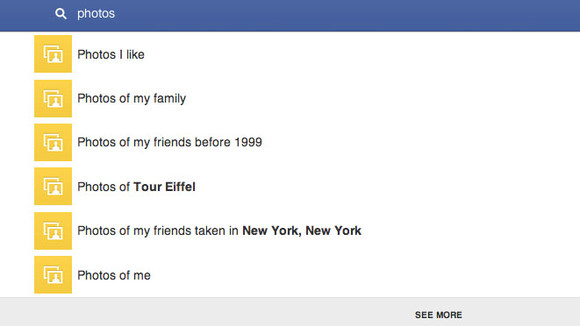
"photos I like"; "photos of my family"; "photos of my friends before
1999"; "photos of my friends taken in New York"; "photos of the Eiffel
Tower"
Places: "restaurants in San Francisco"; "cities visited by
my family"; "Indian restaurants liked by my friends from India";
"tourist attractions in Italy visited by my friends"; "restaurants in
New York liked by chefs"; "countries my friends have visited"
Interests:
"music my friends like"; "movies liked by people who like movies I
like"; "languages my friends speak"; "strategy games played by friends
of my friends"; "movies liked by people who are film directors"; "books
read by CEOs"
Today in international tech news: Google denies that a Street View
expedition killed a donkey, despite its own images that appear
incriminating. Also, a one-man outsourcing scheme is busted, the EC
might force companies that lose data to report it publicly and
Australian authorities investigate the nation's online fake ID market.
Google seems to have had a dustup with a donkey -- literally.
Images plucked from Google Street View have raised questions about whether a Google Street View car ran over a donkey in the African nation of Botswana.
Images culled from Street View show a donkey lying in the road. One of the images also shows dust hovering over the donkey, possibly suggestive of a recent tumble.
News.com.au reports that "the company allege that the Google Street View car approached the donkey which was already lying down," at which point the donkey got up and walked away. However, based on the images it received from Google the donkey then have had to walk backwards, news.com.au said.
Google denies that the donkey was injured.
One-Man Outsourcing Scheme Busted
A software developer for Verizon has been busted for paying someone in China to log in to his work computer and do his work for him, according to PCMag.com.
As the story goes, the man physically shipped his RSA token, a security authentication mechanism, to China, where a contractor used it to log in under the man's credentials during U.S. working hours.
The worker's scheme was reported in a since-removed (but cached) blog post by J. Andrew Valentine, who was part of a forensic and investigative response team within Verizon. The employee in question was not named, but was described in the post as a programmer who was "inoffensive and quiet."
Valentine's post says that the man, who made six figures with Verizon, is thought to have had "the same scam going across multiple companies," according to Valentine's post.
EC Considering Mandatory Data Reports
The European Commission is considering a plan that would force companies that store data on the Web to disclose the loss or theft of personal information, according to The New York Times.
Details of the plan, which would affect companies such as Google, Apple, IBM and Microsoft, are expected to be presented Friday. The proposal, which would supplant the EU's current array of national laws, would impose the first-ever "EU-wide reporting requirements" for companies operating large databases used for Internet searches, social networks, cloud services and e-commerce, according to The Times.
The plan is designed to thwart cybercrime, which is a growing problem in the EU. Numerous "high-profile attacks" have hit businesses and governments, including 821 in Britain in 2011 alone.
Aussie Police Investigate Fake ID Sites
I wish it were this easy to get fake IDs when I was in high school.
Australian police and government authorities are investigation Web-based "fake ID stores," according to Australian outlet The Age.
The IDs are reportedly used to buy booze and get into bars and clubs (duh).
One popular site, fakies.com.au, has promoted itself on Facebook to the tune of nearly 12,000 "likes." The IDs cost about US$60 a pop. The company's notice that its products are "strictly for novelty use" is likely lost on buyers.
Surprise Phone Bills Irk Brits
A spike in consumer complaints to British regulator PhonepayPlus suggests that enormous -- and unexpected -- phone bills are becoming more of a problem for the UK.
PhoneplayPlus reported a 300 percent surge in complaints, according to the BBC. The main culprits, according to the regulator, are apps that are downloaded for free but that then start pestering users to buy things, as well as apps that contain malware and trick people into running up bills.
The tech press started buzzing earlier this month with reports that Facebook planned to add VoIP (voice over IP) calling to its Messenger app for the iPhone. The new feature officially arrived Tuesday, when Facebook released an update for its app.
Facebook's app transmits calls using your phone's broadband connection, whatever it is -- 3G, 4G or Wi-Fi. Instead of sucking up your monthly allotted voice minutes from your cellular carrier, it sucks up megabytes from your data plan. That's a boon for heavy talkers with unlimited data plans.
This is nothing new or technologically groundbreaking: Skype was doing it long before Facebook. Facebook has many more active users than Skype, though, and the allure of having to use one less network or app will appeal to some (perhaps many).
But it's not all roses just yet. For now, this is a pretty limited offering.
Your phone won't alert you the way it does when you have a normal call: Facebook calls just show up as a push notification. And right now, you can only connect with a conversation partner who also has Messenger installed on their iPhone.
There's no way to ring up a Facebook friend who is logged in through the website, and there isn't any way to place a call to a ten-digit phone number. Calling is still absent from the Android and BlackBerry versions of the Messenger app.
There's a good reason for those omissions. The VoIP features in the Web version of Facebook were built using Skype's technologies, while the calling technology in Messenger is all Facebook. The ability to place and receive calls using traditional phone numbers requires telecommunications resources Facebook doesn't have (at the moment, at least).
For the time being, services such as Google (GOOG, Fortune 500) Voice and Skype have a leg up, given their larger feature sets. But Facebook generally doesn't let anything remain in stasis for long. As we've seen in the past -- and caught a glimpse of yesterday with the Graph Search reveal -- Facebook likes to start small, and steadily flesh out its products. Expect the same with voice calling.
And unlike Google Voice and Skype (which is owned by Microsoft (MSFT, Fortune 500)), Facebook is 100% platform neutral. Facebook (FB) doesn't care if you use its app on an iPhone, Android, Windows Phone, BlackBerry or something crazy like Ubuntu.
In a time when every company is saving the best features of its products for its own mobile ecosystem, Facebook has the opportunity to both usurp its direct competition and build out a telecom-slaying voice service.
Facebook’s new Graph Search feature suddenly makes the search bar at the
top of its pages — which you were probably ignoring — a lot more
interesting.
The updated search function, announced Tuesday, lets users dig through most of the the Facebook data that’s visible to them on the site to answer some simple questions. The company is rolling the feature out slowly, so it’s in a limited beta at the moment. But here are some practical ways in which you can or will be able to use Facebook’s Social Graph:
Look for a bite to eat: The graph allows users to look for places, photos, interests and people. But beyond simply searching for area restaurants that your friends “like,” you can tailor your search to restaurants that have gotten a nod from friends who have also posted on Facebook that they lived in a certain country, like Thai food or are vegetarians.
Help with a career search: Your Facebook network may be bigger than you think, given how much gets shared with friends of friends, and Graph Search lets you sift through all of that data. So, if you’re looking for a job in a particular field or city, you could search for “friends of friends who are lawyers” to find some contacts. You could also look for a particular company name to find a contact there. But etiquette dictates that you ask your mutual friend for permission before sending his or her friend a Facebook message.
Find a date: Company chief executive Mark Zuckerberg highlighted this option in Tuesdays press conference, according to a report from VentureBeat. Since Facebook allows users to post whether they’re married, single, in a relationship or romantically “complicated” entanglements, you could run a query for “friends of friends who are single and like mountain biking.” Voilà -- instant date prospect. This could also prove to be an invaluable tool for busybody matchmakers.
Take a nostalgic look back: Heading down memory lane? Photo searches can reveal pictures of your alma mater within a certain time period. Or you can look for photos that folks have posted of themselves as kids by typing in a search for pictures taken before a certain year. As with other queries, you can stack terms in photo searches, so you could also look for photos of a certain place at a certain time. If you’re ready to go back to the future, you can also get ideas for where to go on your next trip by perusing other people’s vacation snaps.
Find a good read: You can look up books your friends like, or be more specific in your query: “books my friends who like War and Peace like.” You can also use this tool to find books that people in certain professions or areas of the country are reading.
Organize a pickup game: If you’re feeling restless, why not search for friends nearby who like the same sport you do — soccer, basketball, ultimate frisbee, whatever — and organize a quick pickup game. The same goes for users seeking running buddies, biking companions or — why not? — chess partners or fans of the same co-op video game.
Finally, if some of these applications seem a little invasive, you can take measures to limit what data of yours go into social graph search. That could involve spending quite a bit of quality time with the network’s privacy tools.
All the things mentioned above are examples of data that you may be sharing with friends of friends or the public. On Facebook, every post comes with its own privacy drop-down menu, so you can adjust your posts and likes whenever you want to restrict it to certain friends or groups. Only those friends will see that information pop up in any of their own searches.
Facebook users can change settings on their bio and geographical information by editing their “About” section. There’s also has a new drop-down menu at the top of most pages that lets you set future default privacy settings for future posts.!
Facebook’s 1 billion users will soon be able to search their friends’ favorite vacation spots or most-traveled running trails using a new tool unveiled by the company Tuesday.
Graph Search marks Facebook’s entry into the search market currently dominated by Google and could allow the social network to leverage the treasure trove of information it keeps on the “likes,” interests and preferences of its users with advertisers.
“Graph Search lets you tap into the value of that information,” said Kate O’Neill, a Facebook product marketing manager.
Facebook said that users will be able to look up such information as “friends who live in my city,” “photos I like” or “Indian restaurants liked by my friends in India” and get the results instantly. Microsoft, which holds a small stake in Facebook, will serve up answers from the Bing search engine when Facebook can’t.
“The social link gives you additional context,” said Andrew Tonner, an analyst with the Motley Fool. “You’re more likely to take some sort of action if someone you know has also had a favorable experience.”
Facebook chief executive Mark Zuckerberg announced the effort with much fanfare at the company’s California headquarters. Investors have been nervous about Facebook’s ability to sustain revenue since its public offering last year and appeared unimpressed by the company’s announcement. Facebook shares, which soared ahead of the announcement, fell nearly 3 percent on the news, closing at $30.10 per share.
The test version will not come with enhanced advertising and is not available on mobile devices, which make up an growing share of Facebook’s traffic.
If the tool is successful, Facebook could become competitive with Google, which has more than 60 percent of the search market and has made a similar attempt to marry search and social data. Although the two companies have similar products, said Ovum technology analyst Jan Dawson, they’re currently serving different audiences.
“Facebook is never going to answer your homework questions,” he said.
Making the network’s data easier to search could raise privacy concerns. Facebook noted that search results will display only data already visible to a particular user.
That mitigates some of the concerns, as does Facebook’s recent push to have users review privacy settings on their older posts, said Justin Brookman, director of consumer privacy at the Center for Democracy and Technology.
The fact that users will have to seek out the information rather than having it automatically displayed also makes a big difference, he said. “It’s not a push — it’s a pull,” he said.
Mark Zuckerberg demonstrated a search service that taps into the information shared by a Facebook user’s friends.
Here are the takeaways from today’s announcement:
Facebook’s Graph Search will
provide a way to sort through all the information shared by those in
your social network using natural language queries.
Based on company demos, Graph Search looks like a promising way to
find products or services you might like, and to identify local
businesses you might want to visit.
Facebook has partnered with Microsoft’s Bing to deliver results from the Web when Graph Search can’t find something.
Zuckerberg says he’d love to work with Google but Microsoft is more willing to work on its terms.
The service will be rolled out to a few hundred thousand people initially.
Facebook plans to broaden it to non-English languages and to other platforms such as mobile, but did not provide a timeline.
2:14 PM With
that we’re done with the formal presentation, and I’m off to check out
Graph Search at the demo stations! Thanks for reading!
2:13 PM: Sixteenth question: how will businesses be able to use Graph Search?
Tom says most business page owners focus on distribution through News
Feed. This is a new context where their information can exist. So it’s
more important to make sure the info on your business page is up to
date. Your tag is the right type for your restaurant, etc.
Seventeenth question: will Instagram data be in there?
Mark says “That should be on the list of things we will hopefully one
day get to.” He reiterates that this is a beta product and they know
they didn’t get to everything. That’s because it’s really hard and takes
years and years.
2:10 PM Fourteenth question: have you tested this with people outside of Facebook?
Tom says they bring users in and let them try it out, and that’s what
led to a lot of the changes they made over time. Mark says user tests
were “very positive”. They didn’t
want to come up with a specific grammar people had to learn. You can
just type things like “friends New York” to get friends who live in New
York. Someone notes that it doesn’t have to be as structured as the way
they phrased things during the demos.
Fifteenth question: in sorting places, are you relying on “likes”?
Lars says when you see a set of results in Graph Search it’s sorted
by a number of features–who has liked, checked in to a place, etc. all
the info they have about a thing is fed into their ranking algorithm.
2:00 PM Eighth question: was there any consideration of working with Google?
Mark says, “I would love to work with google. When we did our Bing
Web search integration we were very public about the fact that this
wasn’t a thing we were trying to do with Bing–we want to make search
social in general.”
Ninth question: Why even have Bing in there if people aren’t coming to Facebook to do Web searches?
Mark says there is a lot of content you can find with Graph Search,
but a lot you can’t find with it, too. It’s better to show good Web
results than nothing when people ask certain things, he says.
Tenth question: search is very resource-intensive–what did you have to do to get this all together?
Lars says building out the software for this took more than a year, lots of engineering work.
Eleventh question: any plans to couple voice search with Graph Search?
Mark says not right now.
Twelfth question: What do you want Google to do that they’re refusing to do?
Mark is smiling and not sure what to say. He
says when people share something on Facebook they want to give them the
ability to change things later–take things down quickly, for example.
Google has a system that works really well for them about how they treat
information, but he thinks Facebook is different. Hmm, okay.
Thirteenth question: you’re talking about creating a great user
experience, and that might be when you see restaurants your friends like
to show more info–prices, menus, etc–any plans to add this stuff?
Mark says they have lots of teams at Facebook. They spend most of
their time on helping people share content with other people. As that
info comes online in the coming years, they definitely want to add it to
Graph Search, he says.
1:55 PM Ah, now they’re doing Q&A with Tom, Lars, and Mark.
First question: how will you make sure people understand the difference between hiding from the timeline and hiding from search?
Tom says that at the end of last year they sent a message to users
encouraging them to take a look at their settings, and rolled out easier
privacy controls. And it’s also about pointing out the differences
between hiding things from timeline and from graph search.
Second question: can this be built into products, apps, etc?
Mark says they would love to. “This is really a beta of a V1,” he
says, and there are years of work ahead. Eventually he thinks it will be
useful for developer apps, so that sounds like that coming.
Third question: where do you see advertising, sponsored placement fitting in?
Mark says this could be a business opportunity for them over time,
but for now they want to make it something that is high-quality that
does what users want. They have had sponsored search results for a
while, he reminds us.
Fourth question: how soon will this be available to how many people, and how soon on mobile?
Mark says it’s going to be available to a “very small audience”
today–hundreds or thousands of people. They don’t know what people will
search for, so it’s hard for them to estimate rollout. Mobile is the
next thing they want to take on, but no “concrete estimates” for how
long.
Fifth question: how will what I search for influence the ads I see? And who else can see my searches?
Lars says nobody else can see what you search for.
Sixth question: how do you know this is what people want from Facebook?
Mark says they try to understand what people are trying to get out of
Facebook and synthesize that into products and services anyone can use.
People have been asking for a long time about place search, he says.
“We’re pretty confident from the feedback we’ve gotten that this will be
useful for a lot of folks,” he said.
Seventh question: did Microsoft have any involvement in Graph Search?
Lars reminds us that if Facebook can’t answer your question very well
with graph search, it will show you results from Bing. They worked
closely with the Bing team to make this happen, he says.
Mark says they have “great partnership” with Microsoft and that what
they do highlights the differences between Graph Search and Web search.
1:53 PM Mark
says that there are other Graph Search things they want to get
to–mobile, for example, and other languages beyond English. They also
want to index all posts and content on Facebook
Eventually they want to get to Open Graph, too, meaning all the other
content fed into Facebook. “It’s really an honor to be able to build
this service and offer it to the world,’ he says. The service will be in limited beta starting today at facebook.com/graphsearch. They’re slowly rolling it out, he says
Oh, now we’re going to watch a quick video about graph search. Lights
down! Thoughtful music swelling! The video is showing people doing
various searches and results a commercial for graph search. “photos of
my friends” for an ex; “photos before 1995”, that sort of thing. These people look like they’re having lots of fun. The end. Clapping, not me, but others. I feel no need to clap the ad.
“Graph Search is the kind of product we love to build at Facebook.
It’s a big technology problem, and it’s also a big social problem,”
Zuckerberg says. “This is who we are–we love building things like this,”
he says.
1:49 PM Mark
is back on the mic. He says Facebook built a few tools to demonstrate
all the things people will be able to see with Graph Search. He says the
company wants to get these tools in front of people before everyone in
the world gets access to Graph Search.
So there will be an “encouragement” on everyone’s home screen that
lets them see what will be happening. And you can click things you don’t
want showing up in search.
Another thing: when you can’t find what you’re looking for, Facebook
will show some search results from the wider Web through a partnership
with Microsoft’s Bing. It’s Bing-powered web search on Facebook. Uh-oh,
Google.
So if you’re searching for an artist’s new album or the weather in
Menlo Park, this would show you results drawn from Bing but on
Facebook. Mark doesn’t expect people
will come to Facebook to do general Search queries, but he thinks it’s
useful for Facebook to have it.
1:44 PM Tom is
telling us one last thing: they realize people will care about what
shows up about them in search, and they have some “great tools” to help
with that. Is Facebook a little touchy about privacy, perhaps?
The existing privacy shortcuts are available on the upper right side
of screen if you click the little lock icon, Tom says. You can see your
activity log in there–things you’ve liked/posted/commented on/etc. And
on the left are filters. You can click on one–say the photos one–and see
the set of photos that has been uploaded and tagged with you in them.
You can see which ones are publicly shared, shared with friends of
friends, hidden from timeline, etc. You
can then send a note to the owner of those photos (assuming they’re not
yours) asking them to take them down if you hate them–rather than just
untagging yourself from embarrassing photos.
1:38PM Okay, Lars
is back on the scene to show us Graph Searches involving places. He
also wants to remind us you can still search for friends by name, pages,
groups, apps, all by name. He
talks about how he had a toothache and needed a dentist, so he typed in
“dentists liked by my friends”. The second result, of course, was Mark
Zuckerberg’s dad, who is a dentist. But he chose a closer one (Zuck’s
dad is on the East Coast, of course).
He then searches for “restaurants in San Francisco, California”. Lots
of restaurants show up–they show what his friends like, what’s popular.
To get more specific he types “restaurants in San Francisco, California
liked by my friends from India” and it shows him some Indian, Thai, and
Mexican places.
This could be very useful–I often want to know what kinds of
restaurants and shops my friends dig. And this should be making Yelp
very nervous.
Then he searches for “restaurants in San Francisco, California liked
by culinary institute of America graduates”. Veerrrry clever, Lars! It
gives a list of a lot of expensive restaurants in SF, but also some
not-so-pricy ones.
1:33 PM Now Tom
is back, showing us a search for “movies my friends like”, and that will
show you a list of movies your friends like, as well as movies people
who liked those movies liked.
This could make it easier for me to figure out what to watch–an
endless struggle with Netflix. There’s also an option to see video clips
of TV shows that your friends like. “Videos by TV shows liked by my
friends” is the search for this. Now he’s searching for “TV shows liked
by software engineers”.
Heh, “Big Bang Theory” is top of the list. But they also like “Game of Thrones” and “Friends”… hmm. Next query: “TV
shows liked by doctors”. Ha, it turns out doctors like Grey’s Anatomy
and House–those are the first and second ones on the list.
Wow, here’s an interesting query “music liked by people who like Mitt Romney”. This shows Johnny Cash, Pink Floyd, Metallica. “Music liked by people who like Barack Obama” shows Michael Jackson and Lady Gaga.
You can also search for “languages my friends speak”. And you can see
just the friends who speak a particular language–useful if you need
something translated, perhaps.
1:28 PM Another
example: recruiting. Let’s say you want to recruit people from NASA—and
who doesn’t? Stocky searches “NASA Ames Research Center employees who
are friends of Facebook employees”, and a list of these people is the
result. Aand you can see who the Facebook employees are that are friends
with these NASA people. Very neat.
Another search: “People who have been product managers and who have
been founders”. Now he’s seeing all the people he can access who have
this information in their Facebook profiles.
Lars is taking the reins to show us how you can use Graph Search to
find photos. Finding the best photos of your friends? Easy, he says.
“Photos of my friends” is the search. Graph
Search picks out the best photos based on likes, comments, he says.
“For graph search, this is a walk in the park. It’s one of the simplest
things it does, but i don’t think it’s been available before,” he says. A
search for “photos of my friends taken in Paris, France”, “photos of my
friends taken in national parks”. These yield all sorts of fun outdoors
photos. Whoa, a llama! At Machu Picchu. Very cute. Lars, by the way, is wearing a sweet red t-shirt that says “hackathon” on it. Another neat example of image
search: “Photos of Berlin, Germany in 1989” (the year the Berlin Wall
came down). It turns out plenty of people have shared some cool photos
of this. You can hover over
the photos and see who shared them and with what audience–these are a
bunch of publicly-shared photos. It s a very neat way to see history.
They stress that in Graph Search you can only see content you could
already see before. This is just making it way easier to find that
content.
You can also search for “photos i like” to see all the photos you like in one place. That’s actually very cool.
1:25 PM You
really have to see Graph Search for yourself to get a feel for it, Zuck
says. So Tom Stocky and Lars Rasmussen, who worked on it, are invited
up to show it off live. Now we’re going to walk through different search scenarios…
Ruh-roh, a tiny technical glitch here with the background screens. Ah, ok - back to normal.
So there’s a search box at the top, and a number of suggestions come
down below it that suggest things to search for. Someone types “friends
who like star wars and harry potter” and gets back a set of friends, in
this guy’s case 16 of them.
Basically you’re typing in the view of how you want to see Facebook
content, and the content fills in. These results are entirely unique to
you, they say–if anyone else does this same search they’d get different
results, because they’re ordered by how close you are to people.
Another case: you meet someone in real life and want to friend them
on Facebook. So if you meet someone at a party named Chris who is a
friend of Lars, who went to Stanford, you can search for this. Stocky
does this and gets one person–Chris Cox–and can reasonably determine
this is the right person.
Another thing we can do with graph search is find dates! Alright.
Let’s say you want to set someone up with somebody else. So he searches
for “my friends of friends who are single men” and makes it specific to
San Francisco and that the woman in question should be from India,
because the person looking for a date is an Indian woman,
hypothetically.
1:18PM What they came up with looks like a real-time
search. You can type “photos of my friends in Arizona” or whatnot, and
it will try to come up with the rest of the query you’re looking for as
you type. It’s pretty neat-looking, I must say. Let’s talk about what graph search can do, says Zuck. Okay, let’s.
For the beta version, it’s focused on: people, photos, places,
interests. Zuck explains a few months ago “Game of Thrones” was going to
be on and he wanted to invite people so he typed in “my friends who
live in Palo Alto, California, and like game of thrones”. People are
first sorted by their connection to you, so the first result is his
sister.
Another use case: what photo to use on a holiday greeting card?
“Photos of me and priscilla chan” was the query, and the best photos
show up first, he says. (I think he means ones with most likes/comments
but I’m not sure).
Another situation: going places. So you can say “Mexican restaurants
in Palo Alto, California my friends have been to.” That way you’ll see
which friends have been where, which ones liked it, and which entries
they liked for each restaurant.
1:16 PM So what’s the difference between web search and graph search? Zuck is glad you asked!
Web search “is great” he says, but very different from graph
search. If you do a web search for “hip hop”, for example, Web search
will show you links with possible answers to questions you might have
about the subject. In general, web search meant to take any open-ended
query with links that have answers to questions you might want to ask.
Graph search is meant to take a precise query and return an answer. So
you can ask “who are my friends who live in San Francisco?” And it
should show you the answers.
A big design problem they had to solve was: how can they make it so
people can ask these very precise questios in a natural and precise way?
How does graph search work? Filters, he says! “That’s my joke for you
today,” he says. Huh.
Most structured search products out there rely heavily on filters.
But Facebook realized in product development that this wouldn’t scale to
all the connections they want to support. So they came up with
something more natural.
1:14 PM They wanted to build privacy-aware search.
So with graph every piece of content has its own audience. Most content
is not public and you can only search for content that has been shared
with you. (Mark is going talking very fast.)
Already today, Zuck says, about 10 percent of Facebook’s
computational capacity is spent computing privacy checks. “That just
gives you a sense of how seriously we take letting people share anything
they want with any audience out there.”
1:11 PM This is called Graph Search. It is NOT web
search, zuck says “We’re not indexing the web here; we’re indexing our
map of the graph.” The graph is big ad constantly changing: 1 billion
people, 240 billion photos, 1 trillion connections, and this is always
growing; billions and billions of new connections each day, he says. And
there are lots of different kinds of connections–likes, comments, tags,
etc.
Indexing all this content and making it so you can retrieve it
quickly is a very hard technical problem they’ve been working on for a
long time, he says.
1:09 PM Facebook is like a big database, and you
should be able to query it, Zuckerberg says. He mentions a few major use
cases: First, “what’s going on with people around me”? (That’s news
feed). “Who is this person? Tell me their story.” That’s
timeline. Today, we’re going to talk about the third! What is it, Zuck
asks? Is it things my friends like? is it photos of my friends doing
things? What about places my friends have been or like?
“The reality is what’s more interesting than any of these things
individually is giving people the power and the tools to take any cut of
the graph and make any query they want.”
1:05 PM Oh, here’s Mark Zuckerberg. This is the
first big product announcement at this campus, he says. Facebook’s
mission is to make the world more open and connected. The way we do this
is by giving pepoplle tools to map out their connections, he says.
Most people think of Facebook as a tool for getting connected with
people they already know. But before newsfeed people used Facebook to
browse and discover things in their network, he says, and we’re on a
trip down memory lane to see how the social graph helps people make new
connections.
1:02 PM (Eastern Time) We’re going to start in a few
minutes it looks like. We’re in a packed room with two big screens in
the front with the Facebook logo and blue background on them. It’s
reporters at tables and a crowd of Facebook employees in the back behind
us.
 T he desktop on your Linux box used to stand for something very simple. If you were a KDE user, you valued control, power and the ability ...
 E ver since Nikon put a 24-million effective pixel sensor in the D3200 we've been expecting this pixel count to reach a little furth...
 J ust how bad do you have to be to get banned from Gmail? How many policies and terms do you have to violate to warrant suspension, or wor...
 W indows 8 users running Skype will now have the option to exert greater control over who can contact them, thanks to a new software updat...
 M cAfee AntiVirus (AV) Plus 2013 is a sub-$50 home security suite featuring a redesigned user interface (UI), along with extra security too...